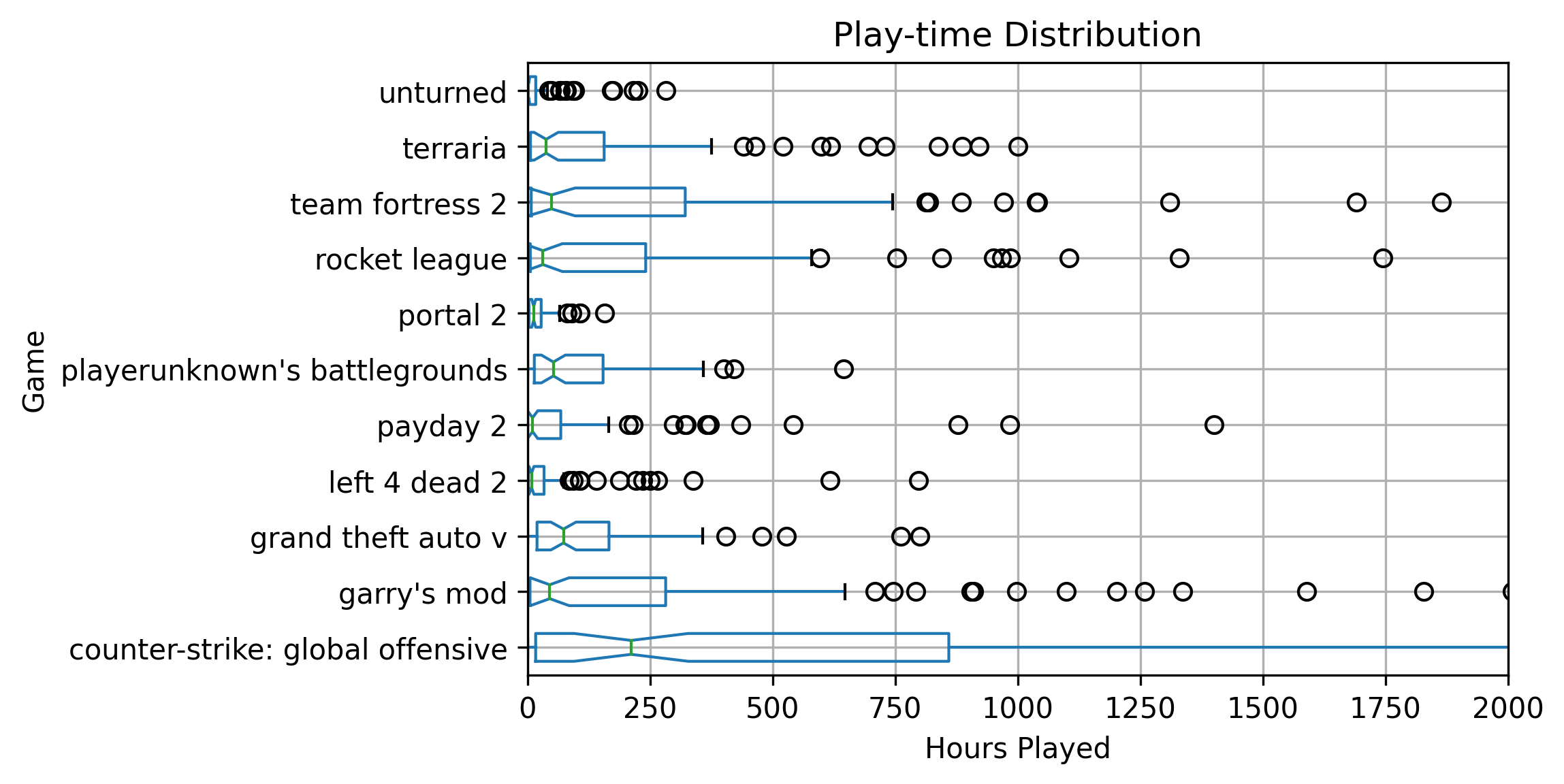
Time Spent In Steam Games
Mon Jul 20 2020
Last week I scrapped a bunch of data from the Steam API using my Steam Graph Project. This project captures steam users, their friends, and the games that they own. Using the Janus-Graph traversal object, I use the Gremlin graph query language to pull this data. Since I am storing the hours played in a game as a property on the relationship between a player and a game node, I had to make a “join” statement to get the hours property with the game information in a single query.
Object o = graph.con.getTraversal()
    .V()
    .hasLabel(Game.KEY_DB)
    .match(
            __.as("c").values(Game.KEY_STEAM_GAME_ID).as("gameID"),
            __.as("c").values(Game.KEY_GAME_NAME).as("gameName"),
            __.as("c").inE(Game.KEY_RELATIONSHIP).values(Game.KEY_PLAY_TIME).as("time")
    ).select("gameID", "time", "gameName").toList();
WrappedFileWriter.writeToFile(new Gson().toJson(o).toLowerCase(), "games.json");
Using the game indexing property on the players, I noted that I only ended up wholly indexing the games of 481 players after 8 hours.
graph.con.getTraversal()
    .V()
    .hasLabel(SteamGraph.KEY_PLAYER)
    .has(SteamGraph.KEY_CRAWLED_GAME_STATUS, 1)
.count().next()Fun With Functional Java
Mon Jul 13 2020
It’s time I tell you all my un-popular opinion: Java is a fun language. Many people regard Java as a dingy old language with vanilla syntax. Please don’t fret; I am here to share the forbidden knowledge and lure you into the rabbit hole that is functional programming esque syntax in Java. And yes, this goes way beyond merely having lambda statements.

1 Ways to create a list
The plain old way of making a list would look something like this:
List<Integer> myList = new ArrayList<Integer>();
myList.add(1);
myList.add(2);
myList.add(3);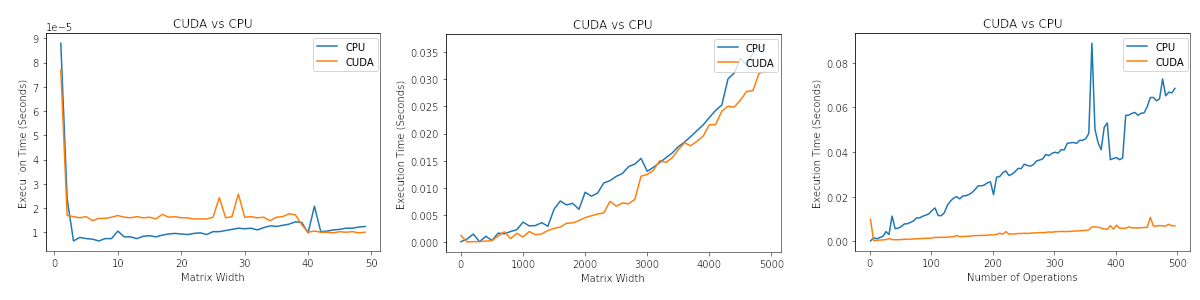
CUDA vs CPU Performance
Fri Jul 03 2020
High-performance parallel computing is all the buzz right now, and new technologies such as CUDA make it more accessible to do GPU computing. However, it is vital to know in what scenarios GPU/CPU processing is faster. This post explores several variables that affect CUDA vs. CPU performance. The full Jupyter notebook for this blog post is posted on my GitHub.
For reference, I am using an Nvidia GTX 1060 running CUDA version 10.2 on Linux.
!nvidia-smi Wed Jul 1 11:16:12 2020
+-----------------------------------------------------------------------------+
| NVIDIA-SMI 440.82 Driver Version: 440.82 CUDA Version: 10.2 |
|-------------------------------+----------------------+----------------------+
| GPU Name Persistence-M| Bus-Id Disp.A | Volatile Uncorr. ECC |
| Fan Temp Perf Pwr:Usage/Cap| Memory-Usage | GPU-Util Compute M. |
|===============================+======================+======================|
| 0 GeForce GTX 1060.. Off | 00000000:01:00.0 On | N/A |
| 0% 49C P2 26W / 120W | 2808MiB / 3016MiB | 2% Default |
+-------------------------------+----------------------+----------------------+
+-----------------------------------------------------------------------------+
| Processes: GPU Memory |
| GPU PID Type Process name Usage |
|=============================================================================|
| 0 1972 G /usr/libexec/Xorg 59MiB |
| 0 2361 G /usr/libexec/Xorg 280MiB |
| 0 2485 G /usr/bin/gnome-shell 231MiB |
| 0 5777 G /usr/lib64/firefox/firefox 2MiB |
| 0 33033 G /usr/lib64/firefox/firefox 4MiB |
| 0 37575 G /usr/lib64/firefox/firefox 167MiB |
| 0 37626 G /usr/lib64/firefox/firefox 2MiB |
| 0 90844 C /home/jeff/Documents/python/ml/bin/python 1881MiB |
+-----------------------------------------------------------------------------+
Creating An Audio Switch
Wed Jul 01 2020
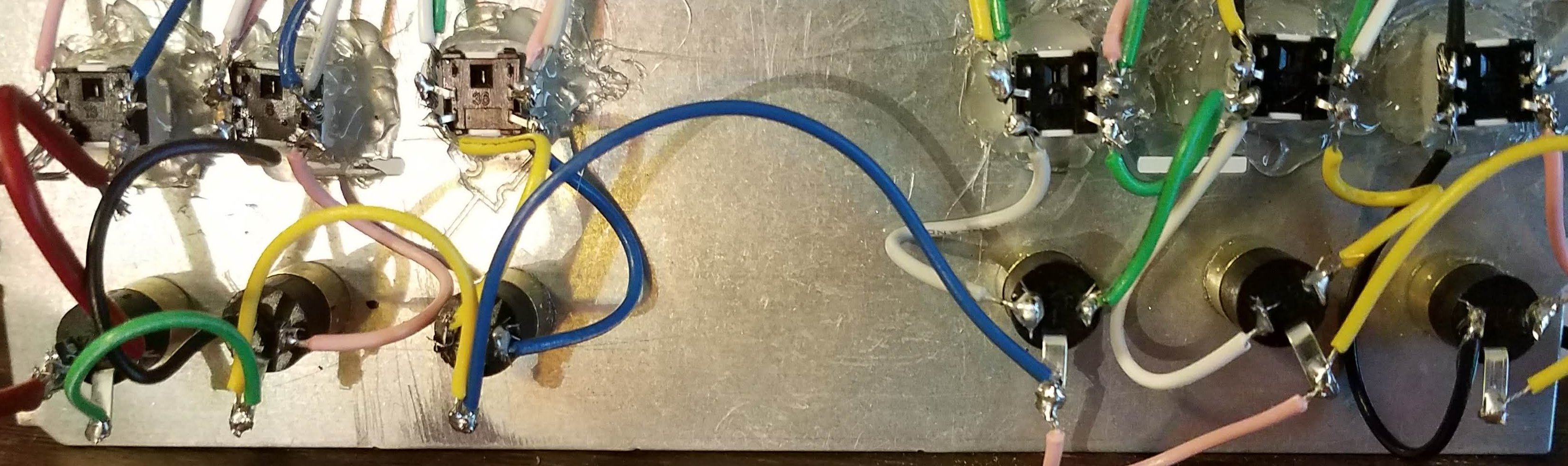
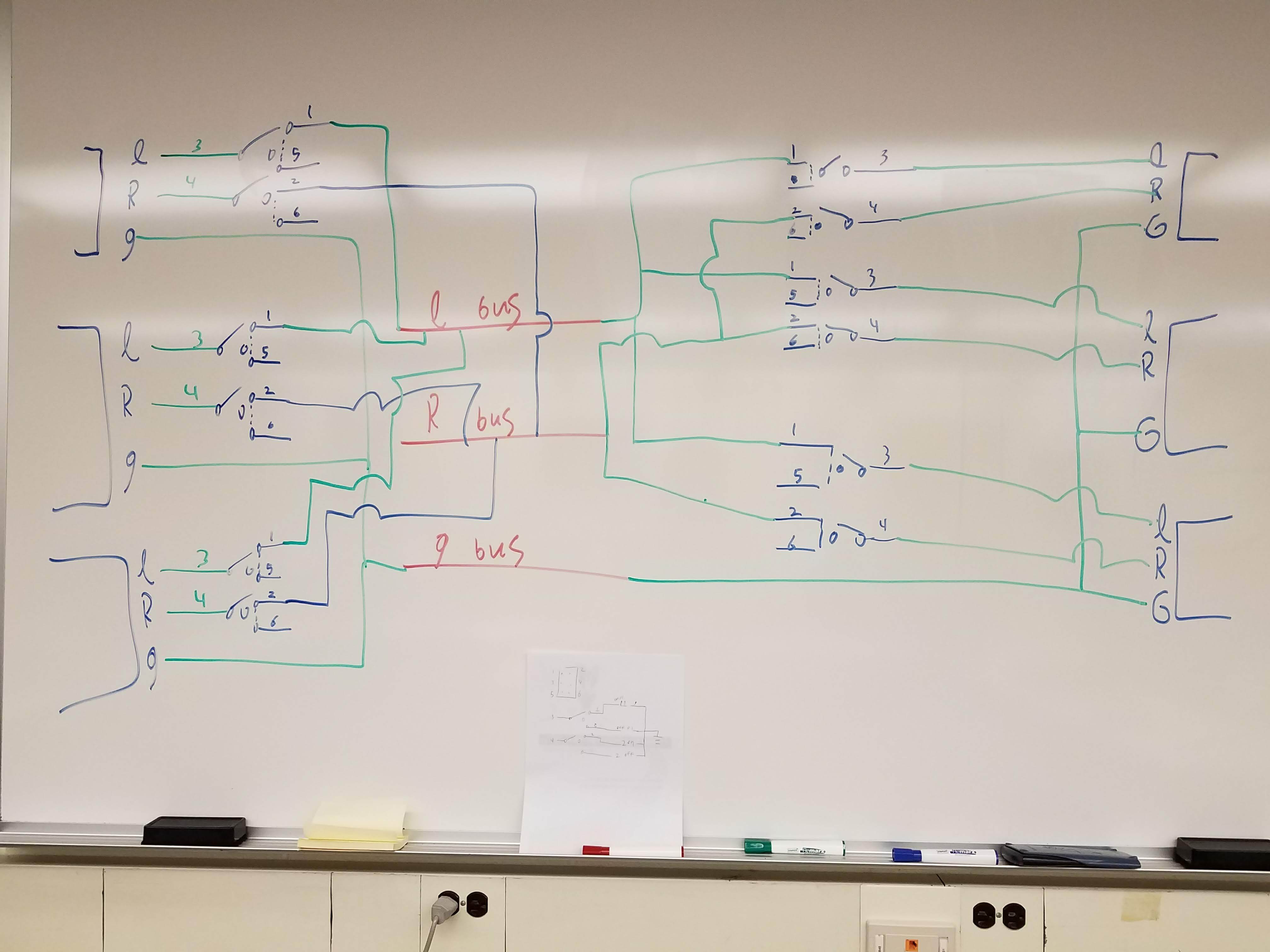
This post covers a bit of an old project, but I wanted to write about how I made my 3.5mm audio switch. The goal of this project was to make an audio switch that had multiple inputs and multiple outputs. At the time, I could not find a commercial product that did this, and similar DIY projects only had multiple inputs and a single output rather than numerous inputs and outputs.
I started this project by making a wiring schematic.
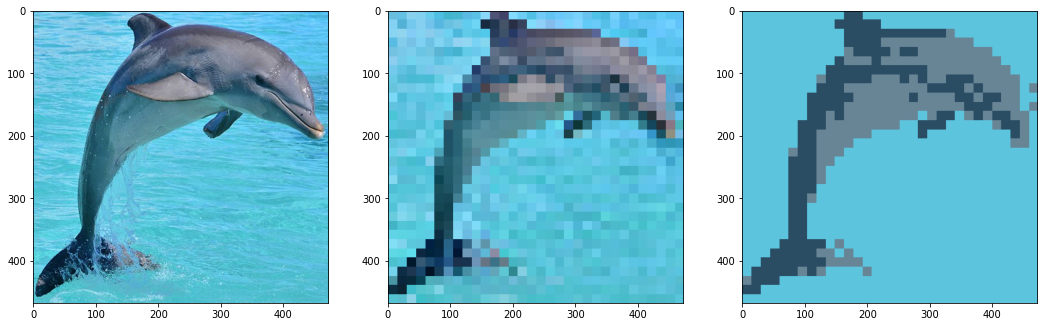
Creating Pixel Art With Open CV
Mon Jun 29 2020
Let’s jump right into the fun and start making pixel art with Open CV. Before you read this article, consider checkout out these articles:
Like most CV projects, we need to start by importing some libraries and loading an image.
# Open cv library
import cv2

# matplotlib for displaying the images
from matplotlib import pyplot as plt

img = cv2.imread('dolphin.jpg')Recent Posts
Server Monitoring and Restart Using a Raspberry PiMy Wall Mounted Raspberry Pi Homelab
The Data Spotify Collected On Me Over Ten Years
Visualizing Fitbit GPS Data
Running a Minecraft Server With Docker
DIY Video Hosting Server
Running Scala Code in Docker
Quadtree Animations with Matplotlib
2020 in Review
Segmenting Images With Quadtrees